Skelly AI trainer

Chrome extension · free

Learn to work with AI while you work.

Skelly AI trainer is a free course in the Chrome side panel and a coach that gives you advice right inside ChatGPT or Claude: better prompts, sensitive-data protection, tips. All local.

Free on the Chrome Web Store

📱 The extension works in Chrome on a computer. Open this page there, for example by emailing yourself the link.

  • chatgpt.com
  • claude.ai
  • no account
  • no analytics
  • English & Czech

Demo · 20 s

One coach. ChatGPT and Claude.

Footage from the real chatgpt.com and claude.ai with the extension installed.

Video · 2 minutes

Start with two minutes

A two-minute animated video, “The AI journey”: where the road leads from a chat in the browser to agents, and where you stand today.

  • In the courseLesson 0.1, right at the start
  • CaptionsEnglish

How it works

A course next to the chat. A coach inside it.

Pick your tool when you start, and the lessons, tips and yellow guides talk about the tool you use.

01

A course in the side panel

Short lessons. Each one starts with a quick multiple-choice question; most end with a prompt of your own that you try straight away in your chat.

  • Connectors explained: let the AI read your sources itself (Gmail, Outlook, SharePoint, Google Drive) instead of copying and pasting.
  • Bones, levels and badges: every step earns points
  • Your progress is stored only in your browser
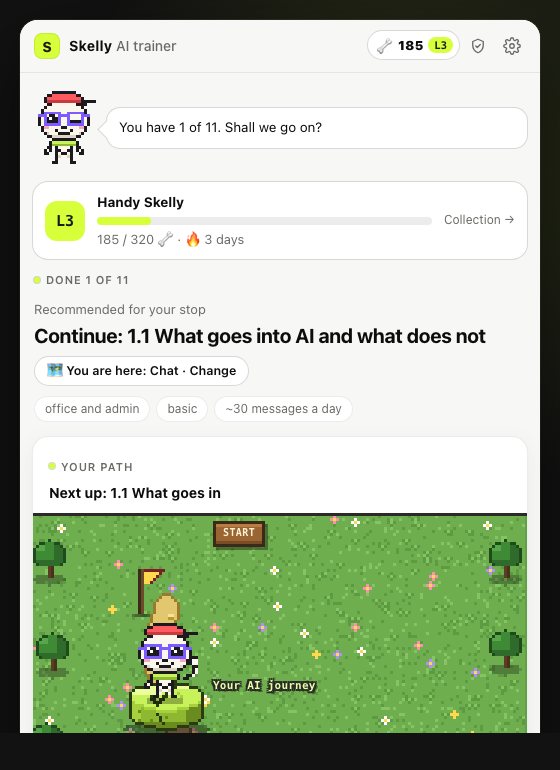
The Skelly AI trainer side panel: Skelly, the level, the recommended lesson and the pixel path of lessons with Skelly
02

A coach right in the chat

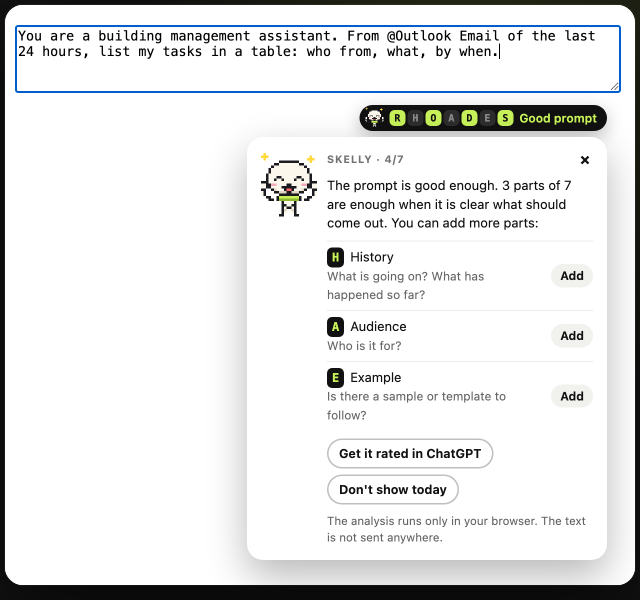
Shows which RHOADES parts your prompt is missing and offers to add them.

  • Sensitive-data check: warns you about a National Insurance number, a US Social Security number, an IBAN, a payment card number, a password or a list of email addresses before you send, and offers to replace them with a placeholder.
  • The prompt analysis runs only in your browser, without AI and without a server.
The coach card under a prompt in ChatGPT: the R H O A D E S badge, a 4 of 7 rating and Add buttons for the missing parts History, Audience and Example
03

Yellow guides show you where to click

Toolkit: ChatGPT or Claude features worth knowing (Projects, connectors, instructions and memory, styles, skills, research…), with a yellow guide that shows you where to click.

  • For connectors, the guide first shows you how to stop a connector from sending or editing.
Illustration: a yellow guide highlights a spot on the chat page and tells you what to do.

The RHOADES method

Seven parts of a good prompt. Three parts are often enough, as long as one of them is Output.

  • RoleWho should the AI act as? (often not needed)
  • HistoryWhat is going on? What has happened so far?
  • OutputWhat exactly should come out, and what is it for?
  • AudienceWho is it for?
  • DataWhere is the material? Pasted text or an attached file. Connectors come in module 3.
  • ExampleIs there a sample or template to follow?
  • StyleWhat length, tone, format?

Tips at the right moment

Dictate instead of typing, connect your email and documents, start a new chat for a new topic. At most one tip a day.

Build your own assistant

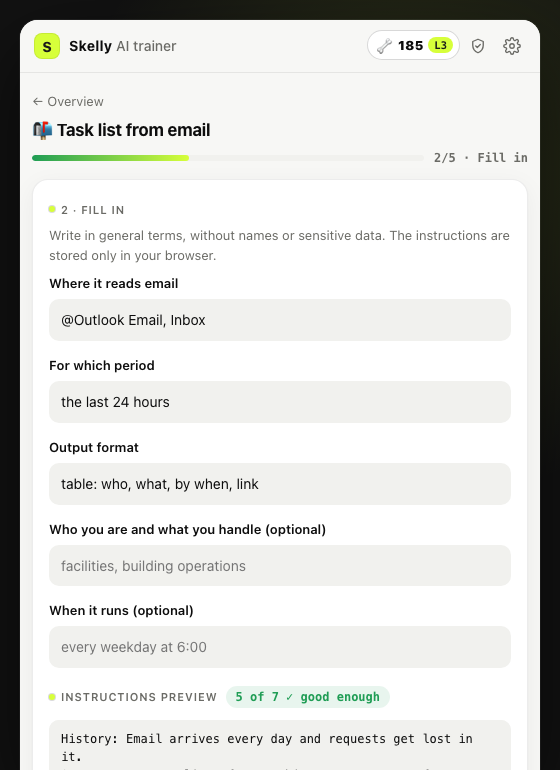
Five templates (email tasks, meeting prep, invoice check, customer replies, weekly report) to turn into your own instructions in a few minutes.

The Task list from email template in the panel, filled in

Bones, levels and badges

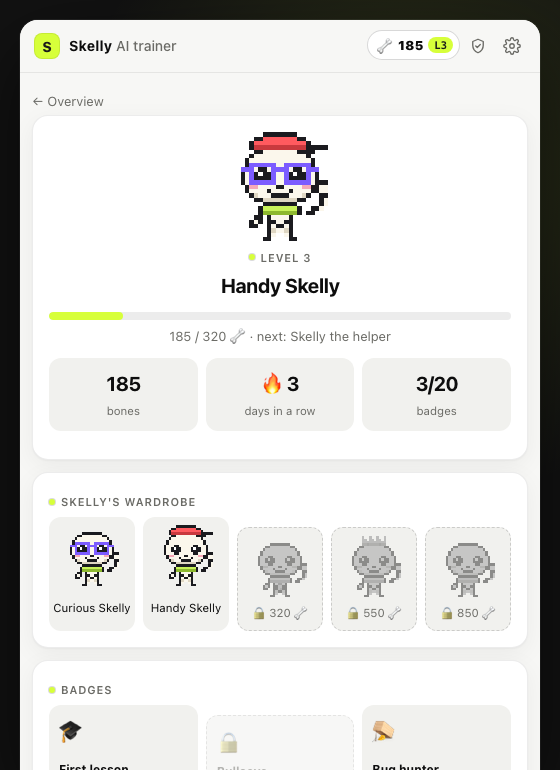
Every step earns points, and Skelly the skeleton grows with you.

The collection in the panel: Skelly at level 3, the number of bones and Skelly’s wardrobe

Your path

11 lessons. One path.

An opening lesson with the video, then four modules: from the basics to your first assistant. Click a stone to see what you will walk away with.

Skelly AI trainer

Your path

A live demo of the lesson map from the extension. The stones work with the keyboard too.

0.1

Your AI journey · 7 min

In 7 minutes: you know where you stand, you have a first finished task in the chat and a step for tomorrow.

BasicsModule 1 · 2 lessons
  1. 1.1

    What goes into AI and what does not

    15 min

    You’ll walk away with: You can clean your own text for AI in 10 seconds, model training is off in your account, and you know why someone has to read what an automation produces.

  2. 1.2

    Dictate, don't type

    10 min

    You’ll walk away with: In 10 minutes: you measure how much you type and how much you dictate in 30 seconds, then send a dictated prompt and answer its follow-up questions by voice too.

Good promptsModule 2 · 3 lessons
  1. 2.1

    RHOADES: from an example to your own prompt

    20 min

    You’ll walk away with: Your own prompt for a task you do again and again at work: tested against a bare sentence, improved, named and saved for tomorrow.

  2. 2.2

    Catch the model out

    9 min

    You’ll walk away with: A duel you won against the model, a tested inbox prompt, and a test set you can rerun on any prompt.

  3. 2.3

    Check before you use it

    12 min

    You’ll walk away with: Your own verification add-on to put after any prompt about a document, and the habit of checking a quote in 20 seconds.

Working with documentsModule 3 · 2 lessons
  1. 3.1

    Contract register in 15 minutes

    15 min

    You’ll walk away with: A register of three contracts in Excel, with the one column that saves money: the last day to give notice. You save the prompt as an assistant, so next time you just attach the next contracts.

  2. 3.2

    Invoice against purchase order

    25 min

    You’ll walk away with: Your own invoice-checking assistant: built on your rules and tested on an invoice you have never seen before.

Your first assistantModule 4 · 3 lessons
  1. 4.1

    Tasks from email: a prompt that misses nothing

    15 min

    You’ll walk away with: A prompt that pulls every task out of the last 24 hours of email, including your own promises, and does not fall for a planted instruction. You test it against an answer key and save it. With a work account and an email connector, lesson 4.2 lets it run every morning.

  2. 4.2

    A morning task list that runs by itself

    15 min + 2 min tomorrow

    You’ll walk away with: A task that prepares a list of tasks from your email every weekday at 06:00. Tomorrow morning you check that it really ran. You need a work ChatGPT or Claude account with an approved email connector and your prompt from lesson 4.1. Connecting the connector may wait for an admin to approve it.

  3. 4.3

    Your process: the map and the first step

    25 min

    You’ll walk away with: A map of one of your own processes (what AI prepares, what you check, what stays with a person), your next assistant built from the first step, and at the end of the course My map with a plan for next week.

Privacy

Nothing leaves your browser.

The extension sends nothing anywhere. The prompt analysis and the sensitive-data check run only in your browser, without AI and without a server. Your progress is stored only in your browser and you can delete it with one click.
In short: the extension sends nothing anywhere. It does not collect, sell or share any personal data. Everything it remembers stays in your browser only.

  • it does not send any data to any server, not even to the author of the extension
  • it has no account, sign-in, analytics, tracking or ads
  • it does not run code downloaded from the internet
  • it does not run on any website other than chatgpt.com and claude.ai
  • This website loads nothing from anyone else either: no analytics, no third-party fonts or scripts.

Where it works

In ChatGPT and in Claude.

Pick your tool when you start, and the lessons, tips and yellow guides talk about the tool you use.

chatgpt.com

ChatGPT · The coach and the yellow guides right on the chat page. Lesson text goes into the chat with one click.

claude.ai

Claude · The coach and the yellow guides right on the chat page. Lesson text goes into the chat with one click.

English and Czech: choose the language when you start and switch any time in Settings (the Czech edition teaches the KOSTRA method with the mascot Kostra). Your progress and points stay. Czech version of this site →

Skelly AI trainer is an independent educational project and is not affiliated with OpenAI or Anthropic. ChatGPT is a trademark of OpenAI. Claude is a trademark of Anthropic.

Free. No account. All local.

Free on the Chrome Web Store

📱 Installs in Chrome on a computer.